Resource Spotlight: EPIC-N Launches the Forums
By: Ada Inman
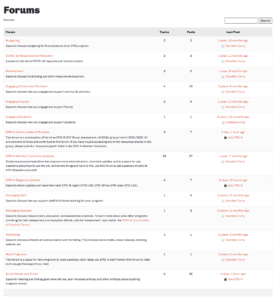
EPIC-N has launched the Member Commons Forums, providing a space for EPIC-N members to engage in idea sharing, information gathering, networking, and more.
Forum topics include Budgeting, EPIC-N Regional Updates, Engaging Faculty, Communities of Practice, Social Media and Press, and more. Any and all members are encouraged to subscribe to forums of their choosing and contribute to them in any way they see fit.
This feature will replace the EPIC-N Listserv to reduce redundancies. EPIC-N Staff will publish additional information to Listserv participants in the near future.
Read below to learn how to navigate the Forums.
Navigating the Forums
To access the forums, follow the steps below:
- Once logged into the Member Commons, click on the “Forums” tab located on the blue ribbon.
- Click on the name of the Forum that you’re interested in viewing.
- Within each Forum there are Topics and within each Topic there are Replies.
- To stay up to date on new conversations taking place in that forum, click “subscribe”.
- Once subscribed, you will receive email notifications when new replies are posted in that forum.
- We are working on adding features for you to be able to adjust your notifications as you desire.
- Like or reply to conversations within the forum and topic area.
Feedback
EPIC-N is committed to continuous improvement and providing quality resources to our members. If you have recently used the EPIC-N Forums, please complete this quick form.